Tile Based Worlds Tutorial Series
A comprehensive guide to building tile-based games using JavaScript and p5.js. This series covers everything from basic programming concepts to advanced techniques like pathfinding and isometric graphics.
Getting Started
- Crash Course in JavaScript - Programming fundamentals
- Why Tiles? - Introduction to tile-based games
- Map Format - How to store tile maps
Basic Gameplay
- More Maps - Working with different map types
- Rendering a Map - Drawing your world
- The Hero - Adding a player character
- Keys to Move - Player movement
- Hit the Wall - Collision detection
Intermediate Mechanics
- Open the Door - Interactive objects
- Jumping - Platform mechanics
- Clouds - Special platform types
- Ladders - Vertical movement
- Stupid Enemy - Basic AI
Advanced Features
- Enemy on Platform - Platform AI
- Shoot Him - Combat systems
- Getting Items - Collectibles
- Moving Tiles - Dynamic environments
- Scrolling - Camera movement
Optimization & Polish
- More Scrolling - Advanced camera
- Depth - Z-ordering and layers
- Mouse to Move - Mouse controls
- Isometric View - 3D perspective
Advanced Graphics
- Isometric Mouse - Mouse in isometric view
- Isometric Scroll - Isometric camera
- Rotate Hero - Character rotation
- Rotate Background - World rotation
AI & Pathfinding
- Pathfinding Breadth-First - BFS algorithm
- Pathfinding Best-First - Best-first search
- Slopes - Diagonal movement
Originally inspired by Tonypa’s tile-based tutorials, modernized for JavaScript and p5.js.
-
Why Tiles?
Ever wondered how games like Super Mario Bros, The Legend of Zelda, or even modern hits like Stardew Valley create their massive worlds? The secret sauce is TILES! You’re about to discover one of game development’s most powerful techniques - and by the time we’re done, you’ll be building your own game worlds faster than you can say “1-Up!”
Tiles aren’t just a retro throwback - they’re still the backbone of modern game development! While we don’t worry about kilobytes anymore, tiles give us something even better: the power to create massive, interactive worlds with lightning-fast performance and surprisingly little code.
-
Map Format
Let’s build our first game world! Maps in tile-based games are stored as 2D arrays - think of them as blueprints that tell your game exactly where to place walls, floors, enemies, and treasure. You’re about to learn how to store entire game levels in just a few lines of code!
TWO DIMENSIONAL ARRAYS: YOUR GAME WORLD IN CODE
Don’t worry - 2D arrays aren’t from another dimension! They’re just arrays containing other arrays. Think of it like this: each row in your game world is an array, and your map is an array of those rows. Let’s start simple!
-
More Maps
Now that you know how 2D arrays work, let’s explore your options! Different games need different map strategies - choosing the right one can save you hundreds of hours of development time and make your game run like butter. By the end of this chapter, you’ll know exactly which approach fits your dream game!
FRAME-BASED MAPPING: The Simple & Sweet Approach
This is the classic approach used in many indie games! Instead of complex tile objects, each number in your array directly represents a sprite frame or tile type. Super simple and perfect for many game types.
-
Rendering a Map
Time to witness some MAGIC! 🎮 You’re about to transform those boring arrays of numbers into a living, breathing game world. By the end of this chapter, you’ll watch your map data come alive on screen - just like the pros do it! This is the moment where your game starts feeling real.
Look at our map array again, but this time imagine it as your game world:
Array: Visual Result: [1, 1, 1, 1] → 🧱🧱🧱🧱 [1, 0, 0, 1] → 🧱 🌟 🌟🧱 [1, 1, 1, 1] → 🧱🧱🧱🧱 Each 1 becomes a solid wall, each 0 becomes walkable space!The result should look like this:
-
The Hero
Time to create your HERO! 🦸 Every legendary game needs a protagonist - someone the player connects with, controls, and cheers for. Whether it’s Mario jumping through pipes, Link exploring Hyrule, or Celeste climbing mountains, the hero makes the game come alive. You’re about to bring your first character into your tile-based world!
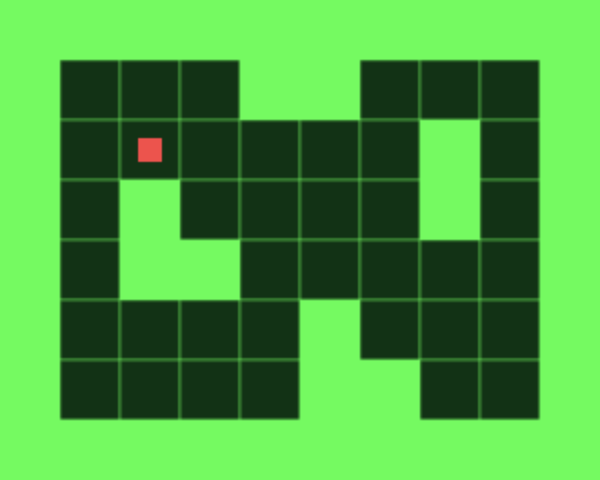
Look at that! Your hero (the red square) is standing proudly in your game world! 🔥
-
Keys to Move
Time to bring your hero to LIFE! 🎮 This is the moment where your game transforms from a static picture into an interactive experience. Player control is what separates games from movies - and you’re about to master it! By the end of this chapter, your hero will respond to your every command, moving smoothly through your tile-based world.
Try it! Use your arrow keys to move the red square around! ⬅️➡️⬆️⬇️
-
Hit the Wall
Time to make your game world SOLID! 💥 Collision detection is what separates real games from slideshows - it’s the magic that makes walls feel solid, platforms feel sturdy, and your hero feel like they truly exist in the world. You’re about to master one of the most crucial skills in game development!
Try it! Use arrow keys to move around. Notice how the hero can’t pass through walls and turns slightly red when hitting them! 🚧
-
Open the Door
Ready to build your first WORLD? 🗺️ One room was just the beginning - now you’re about to create interconnected spaces like the dungeons in Zelda, the sprawling stations in Metroid, or the mysterious houses in classic RPGs. You’re about to become a world builder! ✨
Try it! Move around with arrow keys and walk into the yellow doors to explore different rooms! 🚪✨
-
Jumping
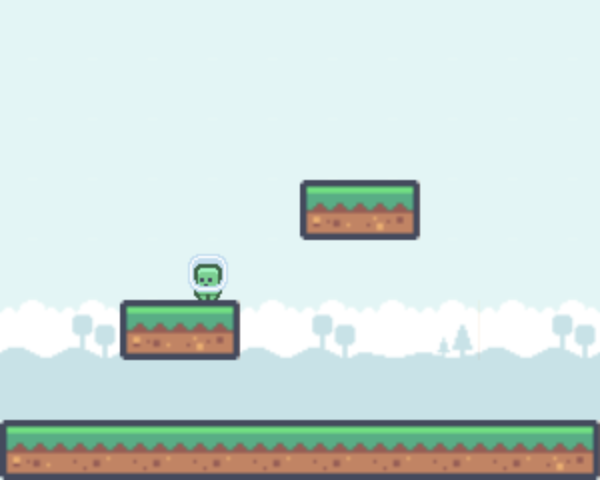
Time to add one of the most satisfying mechanics in gaming - jumping! We’re switching from top-down to side-scrolling view, where your hero can run left and right with arrow keys and launch into the air with the spacebar. Let’s create that perfect jump feel that makes players want to bounce around your world!
Controls: Arrow Keys to move, Spacebar to jumpJump Physics: Making It Feel Right
Every great jump starts with an upward burst! In our coordinate system, moving up means decreasing the Y coordinate. So when you hit spacebar, we set
velocityYto a negative value like-15pixels per frame. -
Clouds
Time to add one of the most satisfying platform mechanics in gaming - cloud platforms! These one-way surfaces let you jump up through them and move through them from the sides, but when you’re falling down, you land on top. Think Mario’s cloud platforms or Mega Man’s jump-through floors - they make platforming feel incredibly smooth and natural!
Controls: Arrow Keys to move, Spacebar to jump
Try this: Jump up through the blue cloud platforms, then fall back down onto them!Understanding Cloud Platforms: The Magic of One-Way Surfaces
See the difference? Let’s break down what makes cloud platforms so special:
-
Ladders
Ready to add vertical exploration to your game world? 🪜 Ladders are one of the most iconic platformer mechanics - think Donkey Kong’s construction sites, Mega Man’s industrial levels, or any classic 2D adventure! You’re about to give your players the freedom to climb up and down through your levels, opening up incredible possibilities for level design!
Controls: Arrow Keys to move, Up/Down to climb ladders
Try this: Use the brown ladders to climb between platforms!Understanding Ladder Types: Design Choices Matter!
Ladders might seem simple, but there are important design decisions to make! Let’s break down the different types:
-
Stupid Enemy
Time to add some DANGER to your world! 👾 A game without enemies is like a movie without conflict - technically possible, but nowhere near as exciting! You’re about to breathe life into your levels with patrolling enemies that turn peaceful exploration into heart-pounding challenge. Even “stupid” enemies can create incredible tension and satisfaction!
Controls: Arrow Keys to move, avoid the purple and turquoise enemies!
Try this: Watch how enemies patrol back and forth - simple but effective!Why “Stupid” Enemies Are Actually Genius! 🧠
Before you think your game needs super-intelligent AI, let’s talk strategy! Many legendary games use beautifully simple enemy patterns:
-
Enemy on Platform
If you want to have enemies in the side view jumping game like this (in the second room):
EXAMPLE HEREYou only need to change couple of lines. The enemy will walk on the platform and detect the end of platform. In the end enemy will turn around and walk back. This requires enemy to check for platform below the next tile he would be on:
getMyCorners (ob.x + ob.speed * ob.xMove, ob.y + ob.speed * ob.yMove + 1, ob); if (!ob.downleft and !ob.downright) { ...Important number to notice here, is 1 in the ob.y+ob.speed*ob.yMove+1. That will check for wall below next tile. Also note how if statement will be true only if both upleft and upright corner are walls, if one of them is walkable tile, enemy would walk into air.
-
Shoot Him
You can kill the enemies in many ways. You can use sword, gun or words (extremely powerful weapon that takes long time to master). Let’s see how we can shoot the enemy (use SHIFT key to shoot):
EXAMPLE HEREWhen I say “bullet”, I mean any object that is flying from the hero looking to kill baddies. It can be cannon ball, arrow, ice cream, penguin etc.
First, we again should think of, what is shooting suppose to do and how will our bullets behave. When key is pressed (SHIFT key), bullet object and movie clip are created on the correct side of the hero. The bullet should start moving straight in the direction hero is facing. If bullet hits the wall or enemy, it is destroyed. If it hits enemy, then enemy is also destroyed.
-
Getting Items
In this chapter we will look how to make our hero pick up some items from the ground. You know the stuff: crystals, coins, dead spiders, healing potions, ammunition:
EXAMPLE HEREItems are different in what they actually do. Some items increase your score, some increase your health or give you more bullets. In this example all items do only one thing - they give you more points. It’s up to you to create other kind of items.
-
Moving Tiles
Gather up, boys and girls, for today I am going to tell you a little story about moving tiles. Some of you may know it already by the name “moving platform”, don’t be fooled by the name, it’s still same cute thing.
Once, long time ago, in the land of tile based games, lived a young tile. He was a happy tile. One fine day a hero came to him and asked: “Young tile, why don’t you move?”
-
Scrolling
Before we start to scroll, we must make one thing very clear. Flash is slow. Flash is extremely slow. Scrolling means moving hundreds of tiles on screen and it should happen 20-30 times in second. Too many scrolling tiles means Flash cant draw them in time and slows down. Your game will crawl like a sleeping snail.
“What?” you might wonder, “no scrolling? And how did snail fall to sleep?”.
-
More Scrolling
Keeping the hero in the center is all fine until we move at the border of map, then we start to see some ugly background outside of the map. You can make this problem disappear, if you build wall tiles inside your map, preventing hero’s approaches to the edge. But that will need additional planning in the maps, and it adds unnecessary empty area around them. Much better idea is to scroll the background only when hero is not near the edge. Like this:
-
Depth
So far we have kept our game strictly two-dimensional. That means if some tile is in front of other tile, it will remain in front no matter what happens in the game. And for those poor unhappy tiles placed in the background will never make it to the front row. Luckily for the tiles on back and maybe not so luckily for the tiles currently in front, we can change the situation. To make our game look better, we will bring in the “depth”, creating illusion of objects being closer or further. Here is an example (move the hero below and above same black wall tile):
-
Mouse to Move
It’s time to let go of the keyboard and grab that little furry thing on your desk. Not that, the computer mouse. While moving hero around with the keys is fine and has been happening for a long time, we should also understand why mouse is so popular. Mouse is so convenient, click here, click there:
EXAMPLE HEREBefore we jump on the mouse, one thing should be made clear. So far our hero was able to move pixel perfect, but that is not the case with the mouse. Mouse control also means hero will be stepping from center of one tile to the center of next and he can’t stop somewhere between two tiles, look around, whistle nice tune. Moving from one tile to another is much simpler than pixel perfect positioning. We don’t need collision detection for example, when we want to walk on next tile, we only check if its walkable and then its all happy walking until we reach the center.
-
Isometric View
Isometric view is great to add depth into your game. Many famous games use this view, because it’s simple to do, but looks good. And best thing about isometric view is how easy it is to create based same old tile based approach. Like this:
EXAMPLE HERETHEORY
First you should know, that actual isometric view (from the mathematics) is little more complicated and never used in games. Now that you know it, forget it. From here on, we only talk about simple isometrics. Maybe best way to imagine isometric, is to look, what happens to the normal square, when its transformed into isometric view:
-
Isometric Mouse
Now that we know how to make isometric view and how to control the hero with mouse, we should go to sleep and forget all about those… Wait, no, I wanted to say we should now combine isometrics and mouse. Hey, wake up!
EXAMPLE HERENothing really new here, we take isometric tutorial and change keyboard control to the mouse control.
CONVERTING FROM ISOMETRIC
The only interesting question in this chapter is how to convert mouse coordinates from the screen to the tiles so we know which tile player has clicked. As you might remember from the previous chapter, we used:
-
Isometric Scroll
Isometric scrolling is no different from the normal top-down view. With very little trouble we can easily combine scrolling engine (chapter 17) with isometric (chapter 21). This will result into isometric scrolling with diamond shaped view:
EXAMPLE HEREWe will count the movement of the char exactly like in the normal scroll and when tile has gone too far, we will move it to the other side. And after all the calculations are done and positions found, we convert it to the isometric view. I’m not going into exact code here, as the idea is explained before and you can look it up from the fla too.
-
Rotate Hero
Hopefully you have noticed how our hero has been so far walking straight. He could walk straight to the left or straight to the right, but not in any angle. Now we will allow player to rotate the hero and walk in any direction. Play with this example, left and right arrow keys to rotate, up and down arrow keys to move:
EXAMPLE HEREFor this kind of game we only need 1 view on the hero as he is always looked directly down. So, you can get rid of all other frames in the char movie clip except the one, where hero faces right. Moving right is default position for movement, when angle of rotation is 0. Don’t forget, the hero is still looked straight down, but he should be placed so he looks at the right.
-
Rotate Background
In the last chapter our hero gained the ability to rotate and walk in any angle. While the hero is surely very thankful for it (and let’s be honest, who wouldn’t) we can make it more interesting by scrolling and rotating the background. The hero will stay in place, but the background is rotated with left/right arrow keys and like rotatable background isn’t enough to make human race happier, the background will also scroll with up/down arrow keys.
-
Pathfinding Breadth-First
One thing common so far with all our examples is how the hero is dumb. If you tell him to move left, he would go left. Surely being dumb is nice when you are in the army, but our hero should have some sort of brains to find its way through the dangers of the world. So, let’s put in some pathfinding.
Before we do, perhaps it would be good idea to say out loud and clear, what is pathfinding. Pathfinding is finding the path from tile A to the tile B. Phew, that went well. And didn’t take days.
-
Pathfinding Best-First
The breadth-first search we created in last chapter, is not too fast. That’s why this time we look into faster algorithm, that would allow usage of larger maps without slowing down the game:
EXAMPLE HEREBEST-FIRST
You may remember from the last chapter, how breath-first search expanded all the nodes in every direction. It had no idea, where the target was, it looked everywhere. Thats why it took forever to find the path. It did find shortest path every time, but lets be honest, whats more important, finding perfect path or making playable game?
-
Slopes
This time we will see how to add slopes:
EXAMPLE HEREMany people have asked me “How do I make my hero walk on the sloped tiles?”. And I usually reply “Why on earth would you want your hero to walk on sloped tiles? Are you not happy with the rectangular tiles? Can’t your hero just jump on the higher tiles?” And then they say “No, I must have sloped tiles”.
-
Crash Course in JavaScript
Beginner
So you might be here because you’re interested in code or fearful of it. Hopefully, this little read will empower you with some basics. And we’ll discover it’s really not too scary and kind of exciting what we can do with very little.
These are some foundational concepts. You don’t have to read or understand this to begin. But if you’re unfamiliar with code you might have a better time if you do. I know it’s boring and a little hard to relate to these ideas without all the context of what you’ll be doing later.